
Hinweis
Gehen Sie zum Ende, um den vollständigen Beispielcode herunterzuladen oder dieses Beispiel über JupyterLite oder Binder in Ihrem Browser auszuführen.
Online-Lernen eines Wörterbuchs von Gesichtspartien#
Dieses Beispiel verwendet einen großen Datensatz von Gesichtern, um einen Satz von 20 x 20 Pixel großen Bildausschnitten zu lernen, die Gesichter darstellen.
Aus programmiertechnischer Sicht ist es interessant, da es zeigt, wie die Online-API von scikit-learn verwendet werden kann, um einen sehr großen Datensatz in Chunks zu verarbeiten. Wir gehen so vor, dass wir jeweils ein Bild laden und zufällig 50 Ausschnitte aus diesem Bild extrahieren. Sobald wir 500 dieser Ausschnitte angesammelt haben (mit 10 Bildern), rufen wir die Methode partial_fit des Online-KMeans-Objekts, MiniBatchKMeans, auf.
Die Einstellung `verbose` bei MiniBatchKMeans ermöglicht es uns zu sehen, dass einige Cluster während aufeinanderfolgender Aufrufe von `partial_fit` neu zugewiesen werden. Dies liegt daran, dass die Anzahl der Ausschnitte, die sie repräsentieren, zu gering geworden ist und es besser ist, einen zufälligen neuen Cluster zu wählen.
# Authors: The scikit-learn developers
# SPDX-License-Identifier: BSD-3-Clause
Daten laden#
from sklearn import datasets

faces = datasets.fetch_olivetti_faces()
Lernen des Wörterbuchs von Bildern#
import time

import numpy as np

from sklearn.cluster import MiniBatchKMeans
from sklearn.feature_extraction.image import extract_patches_2d

print("Learning the dictionary... ")
rng = np.random.RandomState(0)
kmeans = MiniBatchKMeans(n_clusters=81, random_state=rng, verbose=True, n_init=3)
patch_size = (20, 20)

buffer = []
t0 = time.time()

# The online learning part: cycle over the whole dataset 6 times
index = 0
for _ in range(6):
    for img in faces.images:
        data = extract_patches_2d(img, patch_size, max_patches=50, random_state=rng)
        data = np.reshape(data, (len(data), -1))
        buffer.append(data)
        index += 1
        if index % 10 == 0:
            data = np.concatenate(buffer, axis=0)
            data -= np.mean(data, axis=0)
            data /= np.std(data, axis=0)
            kmeans.partial_fit(data)
            buffer = []
        if index % 100 == 0:
            print("Partial fit of %4i out of %i" % (index, 6 * len(faces.images)))

dt = time.time() - t0
print("done in %.2fs." % dt)
Learning the dictionary...
[MiniBatchKMeans] Reassigning 8 cluster centers.
[MiniBatchKMeans] Reassigning 5 cluster centers.
Partial fit of  100 out of 2400
[MiniBatchKMeans] Reassigning 3 cluster centers.
Partial fit of  200 out of 2400
[MiniBatchKMeans] Reassigning 1 cluster centers.
Partial fit of  300 out of 2400
[MiniBatchKMeans] Reassigning 3 cluster centers.
Partial fit of  400 out of 2400
Partial fit of  500 out of 2400
Partial fit of  600 out of 2400
Partial fit of  700 out of 2400
Partial fit of  800 out of 2400
Partial fit of  900 out of 2400
Partial fit of 1000 out of 2400
Partial fit of 1100 out of 2400
Partial fit of 1200 out of 2400
Partial fit of 1300 out of 2400
Partial fit of 1400 out of 2400
Partial fit of 1500 out of 2400
Partial fit of 1600 out of 2400
Partial fit of 1700 out of 2400
Partial fit of 1800 out of 2400
Partial fit of 1900 out of 2400
Partial fit of 2000 out of 2400
Partial fit of 2100 out of 2400
Partial fit of 2200 out of 2400
Partial fit of 2300 out of 2400
Partial fit of 2400 out of 2400
done in 1.04s.
Ergebnisse plotten#
import matplotlib.pyplot as plt

plt.figure(figsize=(4.2, 4))
for i, patch in enumerate(kmeans.cluster_centers_):
    plt.subplot(9, 9, i + 1)
    plt.imshow(patch.reshape(patch_size), cmap=plt.cm.gray, interpolation="nearest")
    plt.xticks(())
    plt.yticks(())


plt.suptitle(
    "Patches of faces\nTrain time %.1fs on %d patches" % (dt, 8 * len(faces.images)),
    fontsize=16,
)
plt.subplots_adjust(0.08, 0.02, 0.92, 0.85, 0.08, 0.23)

plt.show()
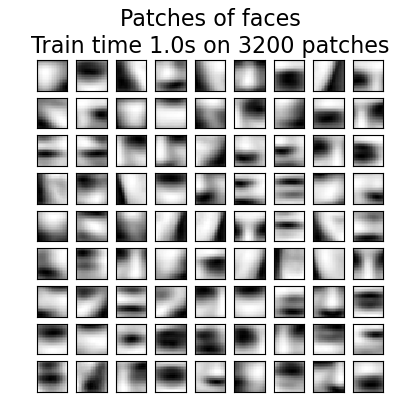
Gesamtlaufzeit des Skripts: (0 Minuten 1,721 Sekunden)


Verwandte Beispiele
Vergleich der K-Means und MiniBatchKMeans Clustering-Algorithmen